
esxi:media_server
This is an old revision of the document!
Media Server
Uses Swizzin to setup a media server with Plex and various downloaders
Setup
First, install a minimal installation of Debian 10 with the following changes:
- VM Name:
Swizzin Media Server - Hostname:
Optiplex-Media-Swizzin - CPU: 3
- Memory: 3 GB
- Hard Disk: 100 GB
- Enable autostart with a priority near the end
- Doesn't matter what username is used for the non root user
Install Debian 10
- Download the latest
64-bit PC netinst isofile from debian.org - In ESXi:
- Upload the iso to the iso folder in the datastore
Create/Register VM:Create a new virtual machine- Name the VM, and choose
LinuxandDebian GNU/Linux <xx> (64-bit) - Specify the desired
Target Datastore - Customise:
CPU:- Use the full amount of cores per socket to end up with one socket
- If using NVMe storage for the datastore:
Add other device>NVMe controllerHard Disk 1>Controller location>NVMe controller 0- Remove
SCSI controller 0
VM Options>Boot Options> EnableForce BIOS setup- Select other appropriate VM settings depending on desired applications
- Confirm settings and
Finish
- If autostart is desired for this machine go to
Host>Manage>System>Autostart:- Click on the current VM
Enable- Use
Start earlierandStart laterto set the desired order
- Go to
Virtual Machineson the sidebar and click on the current VM- Run and then stop the VM, it should have booted to its BIOS
- Give the VM a static IP address from your router using the generated MAC address (found under
Hardware Configuration>Network adapter 1) and desired hostname - Power on the VM
- Go through the Debian setup process
- Give an empty password for
rootto disable root login and setup sudo - In software selection, selecting only the
SSH serverandStandard system utilities
- Once setup is finished and it has booted
- Log in as the created user
- Run:
# Install VMWare tools if not already
sudo apt install open-vm-tools

# Change the SSH port to 50001:
sudo sed -i "s/#Port 22/Port 50001/" /etc/ssh/sshd_config
# Optionally enable root SSH login
sudo sed -i "s/#PermitRootLogin prohibit-password/PermitRootLogin yes/" /etc/ssh/sshd_config

# Optionally set the timezone to UTC:
timedatectl set-timezone UTC

exit
- Shut down the VM
- Edit VM note to be the following:
Minimal server installation of Debian <xx>

Ports:
50001/tcp SSH
- Save a snapshot called
Base Install
Install Swizzin
- Power on the VM
- Login as root using an SSH client
- Delete the non root user with
userdel -r <username> - Start the Swizzin installation with
bash <(wget -qO - git.io/swizzin) && . ~/.bashrc - Follow the setup, selecting the following services, and saving the Deluge ports in the VM note:
- NGINX
- Panel
- Plex
- Deluge
- Jackett
- Lidarr
- Radarr
- Sonarr
 : Make sure the list is correct, and possibly add more
- Check that they can be accessed at https://Optiplex-Media-Swizzin
- Shutdown the server with
shutdown 0 - Create a snapshot called
Swizzin installed
Setup Base Things
- In Caddy, add a reverse proxy entry from
media.domain.comtohttps://Optiplex-Media-Swizzin - In Synology:
- Create a folder called
delugein the root of the Downloads share - Create a user called
Mediaand using a randomly generated password - For each of the following shares:
Downloads,Music, andVideo- Create a snapshot
- Give read/write permission to the
Mediauser
- Open an SSH session to
optiples-media-swizzin:50001using the admin account created with Swizzin and run the following:
sudo apt install cifs-utils

# Setup mount points
mkdir /mnt/Music /mnt/Video
chmod 777 /mnt/Music /mnt/Video
rm -r /home/derek/torrents/deluge # Check using ls -a for hidden files first

# Using this command, add the following lines to fstab:
sudo nano /etc/fstab
# Lines to add (replace the password):
//FileServer/Downloads /home/derek/torrents cifs user=Media,password=<password>,x-systemd.automount,rw,dir_mode=0777,file_mode=0777,uid=1000,gid=1000  0  0
//FileServer/Music     /mnt/Music           cifs user=Media,password=<password>,x-systemd.automount,rw,dir_mode=0777,file_mode=0777,uid=1000,gid=1000  0  0
//FileServer/Video     /mnt/Video           cifs user=Media,password=<password>,x-systemd.automount,rw,dir_mode=0777,file_mode=0777,uid=1000,gid=1000  0  0

# Allow CIFS mounts to show in the panel admin page
# Using this command, change the ''get_mounts()'' function to match the function below
sudo -u swizzin nano /opt/swizzin/core/util.py

# Restart
sudo shutdown 0
The resulting get_mounts() function (added the two lines between the octothorpes):
def get_mounts():
    mounts = []
    with open("/proc/mounts") as mount:
        for line in mount:
            fields = line.strip().split()
            if fields[0].startswith("/dev"):
                if ("boot" in fields[1]) or ("fuse" in fields) or ("/snap/" in fields[1]) or ("/loop" in fields[0]):
                    continue
                else:
                    mounts.append(fields[1])
            ###
            elif fields[0].startswith("//"):
                mounts.append(fields[1])
            ###
    with open("/etc/fstab") as fstab:
        for line in fstab:
            fields = line.strip().split()
            if "bind" in str(fields):
                try:
                    mounts.remove(fields[1])
                except:
                    pass
    return mounts
Configure Services
- Create a snapshot called
Mounts configured, before Plex transfer - Go to
https://media.domain.com - Go to
Plexin the sidebar:- Follow the instructions on https://support.plex.tv/articles/201370363-move-an-install-to-another-system/ using the mounted
Downloadsshare to transfer the Plex files
- Go to
Delugefrom the sidebar:- : Possibly add https://github.com/stefantalpalaru/deluge-default-trackers (Requires using local client) and use https://raw.githubusercontent.com/ngosang/trackerslist/master/trackers_all.txt
Preferences:Bandwidth:- Set an appropriate
Maximum Upload Speed
Queue:Downloading>8
Proxy:Type>Socks5 Auth- Fill in details from Celo.net
- Enable
Force Use of Proxy - Enable
Hide Client Identity
Plugins:- Enable
Label
- Go to
Jackettfrom the sidebar:- Sign in with the password used to set up Swizzin
- Add desired indexers
- Keep the page open to add the feeds into Sonarr and Radarr
- Go to
Sonarrfrom the sidebar:Settings:- Enable
Show Advanced Media Management:- Enable
Rename Episodes - Add brackets around each of the quality tags in the formats
Season Folder Format>Season {season:00}Specials Folder Format>Season 00Multi-Episode Style>Range- Disable
Use Hardlinks Instead of Copy - Enable
Import Extra Files, keeping justsrtenabled Add Root Folder>/home/derek/torrents/Video/TV ShowsSave Changes
- : Profiles
Quality:- Follow the quality settings in Quality_Settings
Indexers:- Add the indexers from Jackett using their instructions, except to replace the start of each of the URLs with
http://localhost:9117
Download Clients:- Add new client:
Name>DelugeHost>localhostPort> The Deluge Web Port saved from earlierPassword> Your Swizzin password
Connect:- : maybe setup notifications?
UI:First Day of Week>MondayWeek Column Header>Tue 25/03Short Date Format>25/03/2014Long Date Format>Tuesday, 25 March, 2014Time Format>17:00/17:30Save Changes
- Import your current media
- Go to
Radarrin the sidebar:Settings:- Enable
Show Advanced Media Management:- Enable
Rename Movies - Add brackets around the quality tag in the
Standard Movie Format - Disable
Use Hardlinks Instead of Copy - Enable
Import Extra Files, keeping justsrtenabled - Enable
Unmonitor Deleted Movies Add Root Folder>/home/derek/torrents/Video/MoviesSave Changes
Custom Formats> Add new custom format >Import> Paste the custom format import string from belowProfiles:- Edit the
Anyprofile:- Set the
HEVCcustom format score to50
- : Profiles
Quality:- Follow the quality settings in Quality_Settings
Indexers:- Add the indexers from Jackett using the
Jackettpreset ofTorznab, changing the name, replacingYOURINDEXERwith the name used in Jackett, the API Key from Jackett, and setting appropriate categories Availability Delay>3Days- Add a
Restrictionwith aMust Not Containof3d
Download Clients:- Add new client:
Name>DelugeHost>localhostPort> The Deluge Web Port saved from earlierPassword> Your Swizzin password
Connect:- : maybe setup notifications?
UI:First Day of Week>MondayWeek Column Header>Tue 25/03Short Date Format>25/03/2014Long Date Format>Tuesday, 25 March, 2014Time Format>17:00/17:30Save Changes
- Import your current media
- Go to
Lidarrin the sidebar:Settings:- Enable
Show Advanced Media Management:- Enable
Rename Tracks - Potentially use the following formats that match iTunes:
Standard Track Format>{track:00} {Track Title}Multi Disc Track Format>{medium:0}-{track:00} {Track Title}Album Folder Format>{Album Title}
- Disable
Use Hardlinks Instead of Copy Add Root Folder>/home/derek/torrents/Music/iTunes/iTunes Media/Music/Add Root Folder>/home/derek/torrents/Music/Add to Music/Lidarr/Save Changes
- : Profiles (Add Metadata Profile to allow greatest hits albums)
Quality:- Follow the quality settings in Quality_Settings
Indexers:- Add the indexers from Jackett using their instructions, except to replace the start of each of the URLs with
http://localhost:9117
Download Clients:- Add new client:
Name>DelugeHost>localhostPort> The Deluge Web Port saved from earlierPassword> Your Swizzin password- Enable
Add Paused
Connect:- : maybe setup notifications?
UI:First Day of Week>MondayWeek Column Header>Tue 25/03Short Date Format>25/03/2014Long Date Format>Tuesday, 25 March, 2014Time Format>17:00/17:30Save Changes
- Import your current media, making sure not to import the
Compliationsfolder
: setup any other upgrade things?
# Follow the setup from the following, using defaults except for daily updates selecting no
sudo box upgrade plex
- Shutdown the VM and create a snapshot called
Configured
: Figure out Lidarr process
Deluge Chrome Integration
Set up Remote Torrent Adder (Github) for Chrome:
- Add the extension to Chrome Remote Torrent Adder
- Open the extension options through Chrome’s wrench menu and set your server’s info:
Add Server:Name>DelugeServer type>Deluge WebUI
- Fill in details:
Host><media.domain.com>Port>443Enable SSLUsername>Your Swizzin usernamePassword>Your Swizzin passwordRelative Path>/deluge
Update
: Write update process and add to update page using {{page>esxi:media_server#Update}}
- If desired, Log in to ESXi, navigate to the docker VM and create new snapshot
- Using an SSH client, connect to <hostname>:50001 then run:
sudo apt update
sudo apt upgrade
sudo reboot  # If desired/needed
sudo box upgrade plex
Sources
Notes
Folder format
~
  torrents          (mapped to //fileserver/Downloads)
    deluge          (Deluge target)
    Music           (symlink on smb server)
      Add to Music
        Lidarr      (Lidarr target)
    Videos          (symlink on smb server)
      Movies        (Radarr target)
      TV Shows      (Sonarr target)
/mnt
  Music             (//fileserver/Music)
    iTunes
      iTunes Media
        Music       (Plex Library)
  Video             (//fileserver/Video)
    Movies          (Plex Library)
    TV Shows        (Plex Library)
Quality Settings
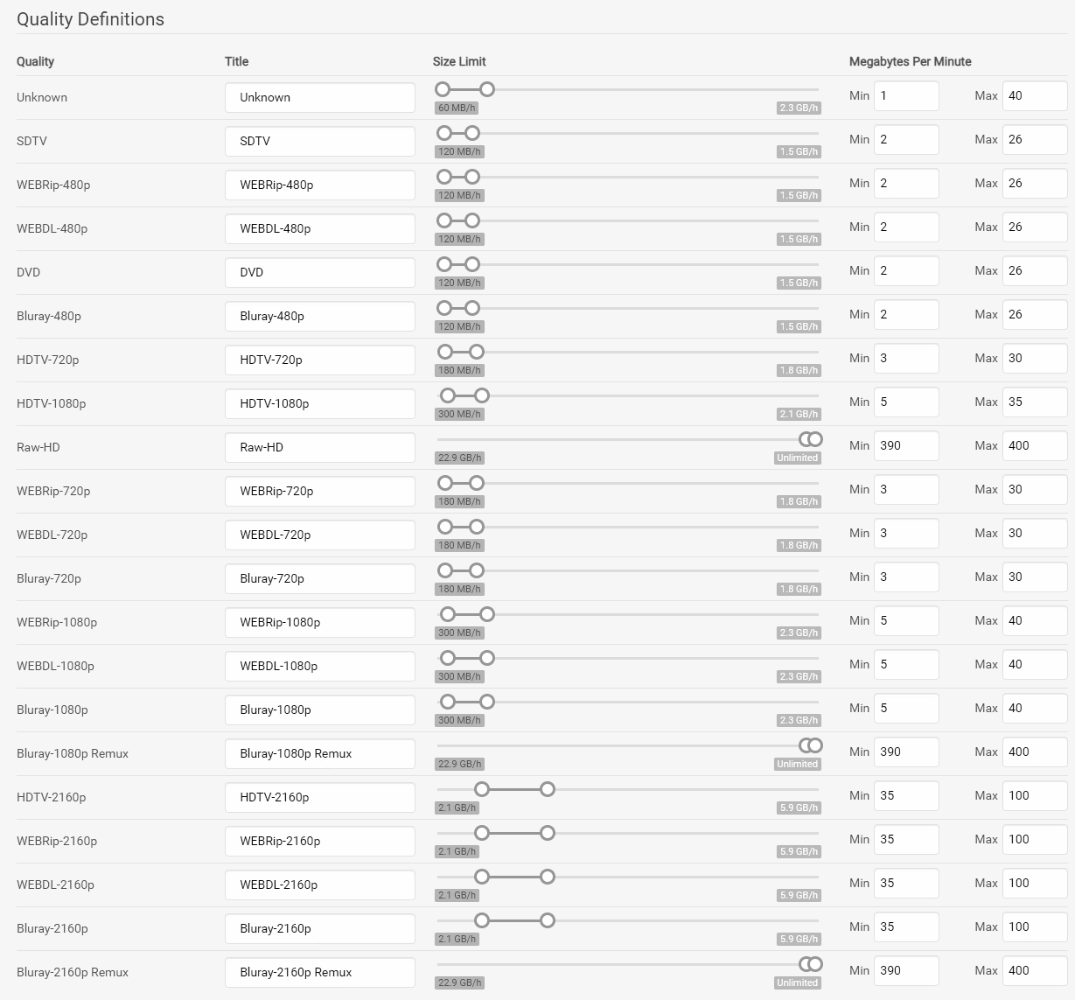
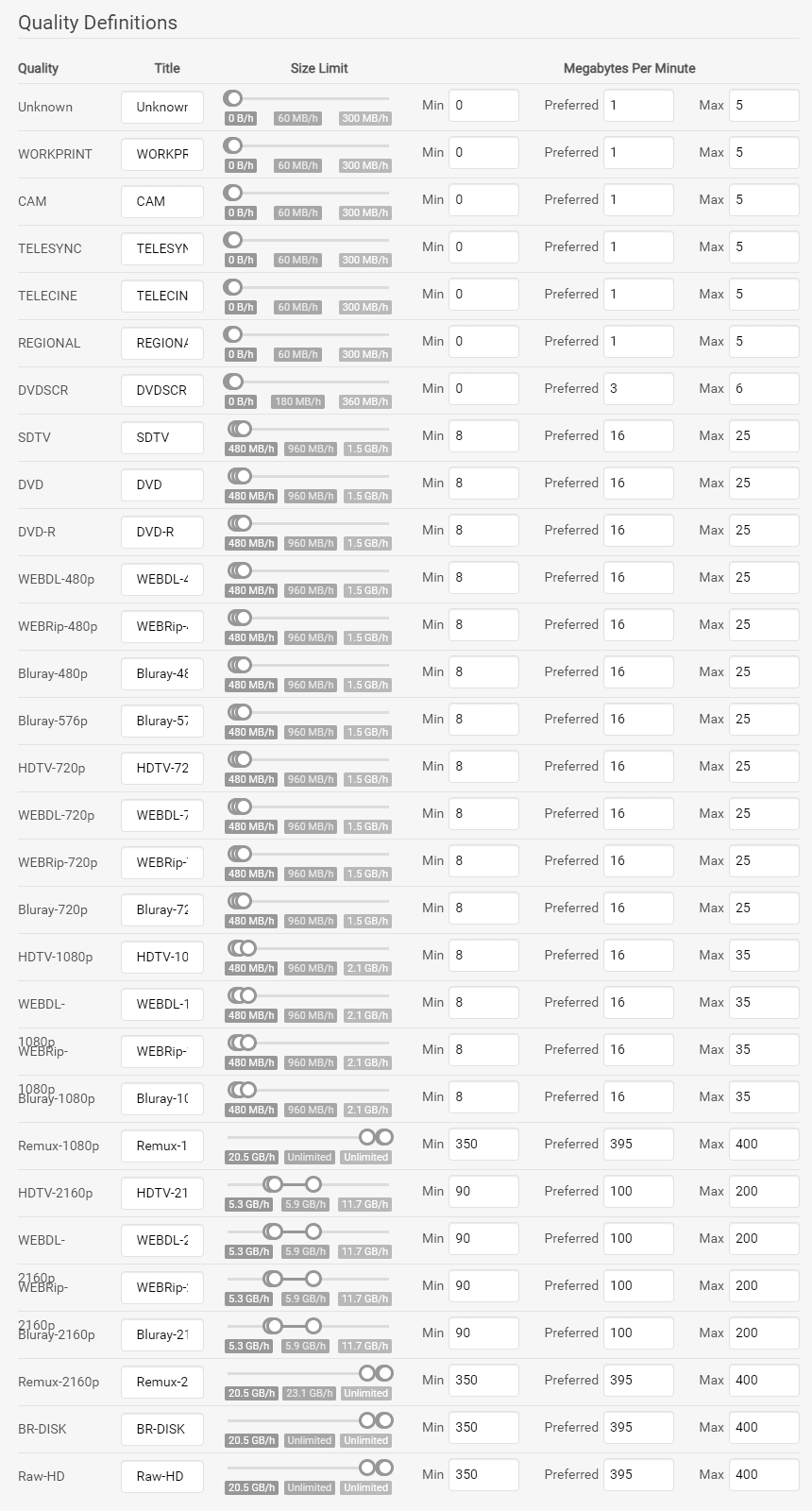
: Lidarr qualities
Alternatives
- Pro version of QuickBox is a similar solution
- OpenFLIXR version 3 when it comes out, is a fully configured option
TODO
- JDownloader2
- Youtube-dl
- Video converter
- get_iplayer
- SoulseekQt http://www.soulseekqt.net/news/node/1 (Elyanta)
- Youtube download playlists
- Filebot
esxi/media_server.1611722689.txt.gz · Last modified: 2024/09/22 19:51 (external edit)


